// Define tool input schema @Schema() abstractclass $WeatherRequest{ @Field(description: 'The city name') Stringget city; }
void main() async { // Initialize Genkit and register the Google AI plugin final ai = Genkit(plugins: [googleAI()]);
// Define a tool the model can invoke to fetch live data ai.defineTool( name: 'fetchWeather', description: 'Retrieves the current weather forecast for a given city', inputSchema: WeatherRequest.$schema, fn: (request, _) async => request.city.toLowerCase() == 'seattle' ? 'Rainy' : 'Sunny', );
// Construct a strongly-typed, observable flow final tripPlannerFlow = ai.defineFlow( name: 'planTrip', inputSchema: TripRequest.$schema, outputSchema: .string(), fn: (request, _) async { // Generate content using the model and tool final response = await ai.generate( model: googleAI.gemini('gemini-3.1-pro-preview'), prompt: 'Build a ${request.days}-day travel itinerary for ${request.destination}. ' 'Make sure to check the weather forecast first to suggest appropriate activities.', toolNames: ['fetchWeather'], ); return response.text; }, );
// Run the flow final itinerary = await tripPlannerFlow( TripRequest(destination: 'Seattle', days: 3) ); print(itinerary); }
// Backend securely proxies requests to the model void main() async { final geminiApi = googleAI(); final targetModel = geminiApi.model('gemini-3.1-flash-lite-preview'); final router = Router() ..post( '/api/gemini-model', shelfHandler( targetModel, // Insert custom authorization logic here contextProvider: (req) async => {'customAuth': true}, ), ); await io.serve(router.call, 'localhost', 8080); }
在您的 Flutter 應用程式中,使用遠端模型而不是直接模型外掛程式,傳遞伺服器所需的任何標頭。這可以避免公開您的 API 金鑰,並讓您對請求授權有更多控制權。
1
2
3
4
5
6
7
8
9
10
import'package:genkit/genkit.dart';
// Flutter app communicates with the proxy server final ai = Genkit(); final secureModel = ai.defineRemoteModel( name: 'secureModel', url: 'https://api.yourdomain.com/api/gemini-model', headers: (context) => {'Authorization': 'Bearer ${fetchSessionToken()}'}, ); final response = await ai.generate(model: secureModel, prompt: 'Write me a poem.');
強大的 AI 開發工具
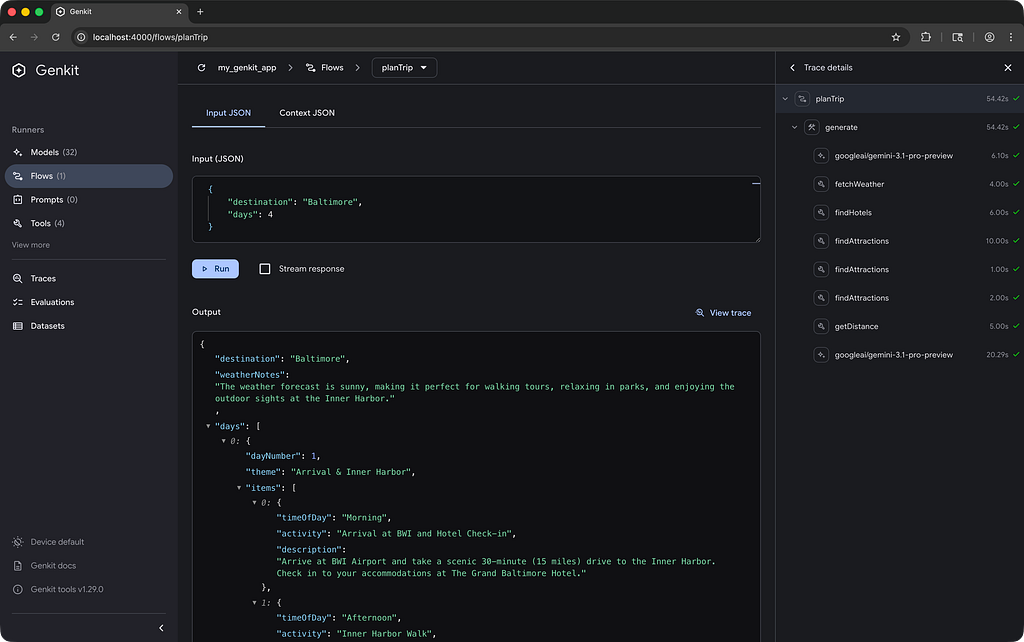
構建高品質的 AI 應用程式需要徹底的測試和持續迭代才能獲得可靠的結果。為此,Genkit 提供了強大的本機開發人員 UI。
您可以透過使用 Genkit CLI 運行您的應用程式來啟動開發人員 UI:
1
genkit start -- dart run bin/server.dart
以下是開發人員 UI 中測試更進階版本的旅遊規劃器流程:
顯示正在運行流程的 Genkit 開發人員 UI
AI 編程輔助
為了在使用 Genkit Dart 搭配 Antigravity、Gemini CLI 或 Claude Code 等 AI 編碼工具時獲得最佳體驗,請安裝 Genkit Dart agent skill。這將使您的 AI 助理具備準確編寫和偵錯 AI 功能的知識。